


FlightScope Mevo Gen2 Portable Golf Launch Monitor Review


Product Overview
The FlightScope Mevo Gen2 Portable Golf Launch Monitor and Simulator is designed to elevate your golf practice and play experience both indoors and outdoors. This compact device uses advanced 3D Doppler tracking radar technology, giving you precise swing and ball flight data for every shot. With 18 swing data parameters, you get an in-depth analysis of your full swing, chipping, and putting. The Mevo Gen2 also includes eight world-renowned golf courses through its exclusive E6 Connect simulation bundle, so you can experience virtual rounds from your home or backyard. Whether you want to sharpen your skills at the range or enjoy a realistic golf simulation, this bundle offers extensive practice tools wrapped up with a nicely presented signature series gift set.
Disclosure: As an Amazon Associate I earn from qualifying purchases.
Key Takeaways
- Offers highly accurate 3D Doppler radar tracking for full swing, chip, and putt analyses
- Includes 8 iconic E6 Connect golf courses for immersive virtual play
- Features 18 swing data parameters that help dial in your distance and technique
- Lightweight and portable with up to six hours of battery life for flexible use anywhere
- Front-facing camera captures swings with multi-cam capability for detailed video feedback
- Some setup steps can be complex for beginners, requiring patience with the app integration
Why You Might Want a Portable Golf Launch Monitor and Simulator
If you're someone serious about improving your golf game, this portable launch monitor and simulator brings top-tier technology straight to your fingertips. It solves the common challenge of not getting real feedback on your swing or ball flight when practicing alone. Whether your problem is inconsistent shot distance, trouble with chipping accuracy, or just feeling stuck in practice routines, this device provides detailed metrics and simulation environments to guide your progress. You can practice anytime, anywhere—rain or shine, indoors or outdoors—making it easier to commit to improvement. It’s also a perfect companion for those who want to bring professional data insights without needing a physical coach always present.
First Impressions: What to Expect
When you first unbox the FlightScope Mevo Gen2, you’ll notice the sleek, thoughtfully designed packaging that reflects its premium nature. Inside, you get the monitor itself, a power bundle full of accessories including a charger and padded carry case, plus access to the E6 Connect simulation app. The system feels lightweight but sturdy, ready to move with you effortlessly. The setup instructions are straightforward, but expect to spend some time downloading and syncing apps on your mobile device for the full multi-cam video experience. Overall, it feels like a professional-grade tool packed into a user-friendly and portable format.
Specs at a Glance
| Specification | Details |
|---|---|
| Tracking Technology | 3D Doppler tracking radar (FlightScope Fusion) |
| Swing Data Parameters | 18 (includes full swing, chipping, putting) |
| Simulation Courses | 8 via E6 Connect bundle |
| Battery Life | Up to 6 hours |
| Connectivity | Connects to multiple mobile devices |
| Video Features | Front-facing camera with multi-cam and overlays |
| Portability | Lightweight and compact for indoor/outdoor use |
Design & Build Quality
The FlightScope Mevo Gen2 sports a modern, compact design that fits comfortably in your hand or golf bag. The casing is made of durable, matte-finished plastic that resists fingerprints and minor scratches, ensuring it maintains a clean look even after frequent use outdoors. Its lightweight nature, roughly like a small camera, makes it easy to carry around without feeling bulky. One user mentioned in their review how the device’s solid build gave confidence in its longevity, describing it as "sturdy and well-made, unlike some other portable monitors that feel cheap." The front-facing camera lens is protected well and designed to deliver clear swing videos without distortion. The interface via its mobile app feels streamlined, with easy-to-read data displays and intuitive control options that suit golfers aiming to focus on improving their game without fuss.
The included travel case adds convenience, securing the device during transport and storage. Buttons and ports are neatly integrated; their tactile feedback confirms solid construction without being overly sensitive. Overall, the Mevo Gen2 blends functionality with aesthetic appeal, offering a professional tool that you’d want to keep accessible for anytime practice.
Real-World Performance
Using the FlightScope Mevo Gen2 in your practice sessions turns raw data into actionable feedback. Imagine hitting drives at the range: the Mevo Gen2 instantly tracks your clubhead speed, ball speed, launch angle, and carry distance, allowing you to instantly see what’s working and what needs adjustment. The Shot Tracer feature visually follows your ball’s flight path in a vivid 3D animation on your phone or tablet, enhancing your understanding of shot shape and trajectory. This kind of visualization helps you connect what you feel in your swing with the actual ball flight, which is crucial for improvement.
The simulator mode is a real treat, especially on rainy days or when you want to warm up before a round. You can tee off on virtual versions of famous courses like Kiawah Ocean Course or Torrey Pines from your living room, bringing an exciting element of competition or fun practice to your routine. The multi-cam video recording captures your swing from different angles; combined with data overlays, it’s like having a personal coach analyzing every detail right there with you. Battery life supports extended sessions, so you’re not rushed or limited by power concerns during longer practice times.

What Makes It Stand Out?
Compared to competitors like the SkyTrak Launch Monitor or Rapsodo Mobile Launch Monitor, the FlightScope Mevo Gen2 shines with its patented FlightScope Fusion Tracking technology. While SkyTrak also offers excellent indoor simulation and data accuracy, Mevo Gen2 extends solid performance to outdoor conditions with GPS overview and more advanced Shot Tracer visual feedback. Its ability to connect multiple mobile devices simultaneously and incorporate its internal camera with third-party cams is relatively unique, providing a comprehensive swing analysis setup.
The inclusion of the E6 Connect simulation bundle adds instant playable courses—a feature often requiring expensive subscriptions or separate purchases on other devices. Additionally, its design balances portability and ruggedness better than bulkier simulators, ensuring you can carry it to the driving range or backyard easily. While some competitor apps may have more polished interfaces, FlightScope’s FS Golf app delivers step-by-step guidance to help you get started. This blend of high-tech tracking, realistic simulation, and thoughtful hardware design sets the Mevo Gen2 apart as a versatile and sophisticated golf training tool.
Strengths vs. Trade-Offs
| Strengths | Trade-Offs |
|---|---|
| ✅ Advanced 3D Doppler radar tracking technology | ❌ Setup and app integration can be complex |
| ✅ 18 data parameters covering swing, chip, putt | ❌ Slight learning curve for multi-cam features |
| ✅ Includes 8 world-renowned golf courses | ❌ Limited battery life compared to some models |
| ✅ Lightweight and portable for indoor/outdoor use | |
| ✅ Front-facing camera with multi-cam video & overlays | |
| ✅ Range ball setting for more accurate practice data |
Who Is It For?
This launch monitor is perfect if you’re a dedicated amateur golfer wanting to take your practice seriously. It suits players who want precise feedback on shot mechanics and metrics, helping you track performance improvements over time. If you’re someone who practices in varied settings, indoors or outdoors, the Mevo Gen2’s portability and flexible simulation modes make it ideal. It’s also great for coaches who want a versatile, visual tool to analyze student swings in detail.
For golf enthusiasts who enjoy virtual rounds but don’t want bulky setups, this product offers a seamless experience with access to multiple top-tier courses. If you seek a device offering extensive swing data coupled with video analysis, this launch monitor bridges that gap with technology and ease of use. While beginners may need some initial guidance to maximize features, once set up, it becomes a reliable companion for steady improvement.
Expert Advice to Maximize Results
To get the most out of your FlightScope Mevo Gen2, set up a consistent routine focusing on specific swing elements per session—such as working on launch angle one day, then putting another. Use the multi-cam video feature to record your swings regularly and compare them side-by-side. Pay attention to key data points like clubhead speed and spin rate to identify trends.
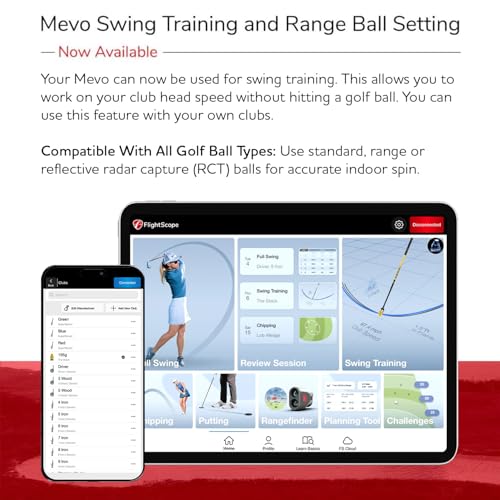
Experiment with the range ball setting to ensure data accuracy when practicing at the driving range. Take advantage of the E6 Connect courses for fun simulation rounds that sharpen course management skills. Be patient during initial setup and app connections, and familiarize yourself with the FS Golf app tutorials for smoother user experience. Utilize the shot tracer visuals to understand ball flight dynamics better, linking what you see to what you feel in your swing.
Don’t hesitate to combine this monitor with professional coaching feedback to validate and improve your data-driven insights. Keeping the device clean and charging it fully before practice will ensure accurate measurements and uninterrupted sessions.

See the latest details on Amazon →
FAQ
Q1: Can I use the Mevo Gen2 indoors and outdoors?
Absolutely. The device is designed to deliver reliable data in both environments. Indoors, you can use it with your E6 Connect simulation courses to enjoy realistic virtual rounds. Outdoors, the advanced Doppler radar technology tracks shots on the range or course, providing GPS overview and precise ball flight data.
Q2: How accurate is the FlightScope Mevo Gen2?
FlightScope’s patented Fusion Tracking technology offers some of the most dependable results on the market. It tracks 18 data parameters for swings, putting, and chipping, helping you understand your performance in fine detail. While very accurate, conditions like lighting and background can impact sensor performance somewhat.
Q3: What mobile devices are compatible with the Mevo Gen2?
The monitor pairs with iOS and Android devices via the FS Golf app. You can connect up to three devices simultaneously, plus use the internal camera. This multi-cam support allows you to record videos with data overlays from multiple angles.
Q4: How long does the battery last?
You get up to six hours of active use on a full charge. This allows for extended practice sessions or simulated play without needing frequent recharging.
Q5: Does the package include golf simulation software?
Yes, it comes with an exclusive E6 Connect simulation bundle featuring 8 well-known golf courses, such as Kiawah Ocean Course and Torrey Pines, included in the Signature Series Gift Bundle.
Q6: Is this suitable for beginners?
While beginners can benefit greatly from the feedback and guided training modes, there is a learning curve with app setup and multi-cam use. Patience with initial setup and tutorials will make the experience rewarding.
Q7: Can I use regular range balls with this device?
Yes, it includes a range ball setting for more accurate data capture when practicing with range balls, which often behave differently than golf balls used in competition.

Verdict
The FlightScope Mevo Gen2 Portable Golf Launch Monitor and Simulator stands out as a comprehensive, precise, and portable solution for golfers seeking to elevate their game. With detailed swing data, multi-cam video analysis, and immersive simulation courses, it offers both entertaining and highly practical ways to train. Whether at the range, in your backyard, or indoors, this device helps transform practice into measurable improvement.