


FlightScope Mevo+ GPS Golf Launch Monitor Review

Product Overview
If you're serious about improving your golf game, the FlightScope Mevo+ GPS Golf Launch Monitor and Simulator with Face Impact Software is designed to give you a complete performance edge. This tool goes beyond basic tracking by combining advanced radar tracking with high-speed image processing to deliver precise golf data, whether you’re practicing indoors or outdoors. With over 22 golf data parameters, including vertical and lateral impact analysis, you get detailed feedback on every shot. Add to that 12 E6 golf courses like Pebble Beach and St Andrews, plus 17 practice ranges, and you have an all-in-one training and simulation setup. It’s ideal for dialing in your swing and improving your accuracy, distance, and consistency.
Disclosure: As an Amazon Associate I earn from qualifying purchases.
Key Takeaways
- Advanced FlightScope Fusion Tracking technology ensures reliable and highly accurate golf data.
- Includes 22+ full swing and short game parameters for thorough analysis.
- Comprehensive simulator with 12 full E6 golf courses and 17 practice ranges.
- Face Impact Software adds lateral and vertical impact heat maps for improved ball striking.
- MultiCam video syncing allows recording up to four camera angles for detailed swing review.
- Limited to iOS devices for video feature; requires multiple devices for full MultiCam functionality.
Why You Might Want the FlightScope Mevo+ Golf Monitor
If you’re looking to take your golf practice seriously and want a clear picture of how your swing affects your ball flight, this monitor can be a game-changer. Many golfers struggle to track their real shot data without guesswork or inconsistency. The Mevo+ helps you overcome this by delivering precise measurements covering ball speed, launch angle, spin rates, carry distance, and more. Whether you struggle with hitting the sweet spot or want to practice effectively indoors during bad weather, this system gives you actionable insights to improve. Additionally, if you desire to play real courses virtually or compete with others online, this simulator setup brings that capability straight to your home.
First Impressions: What to Expect
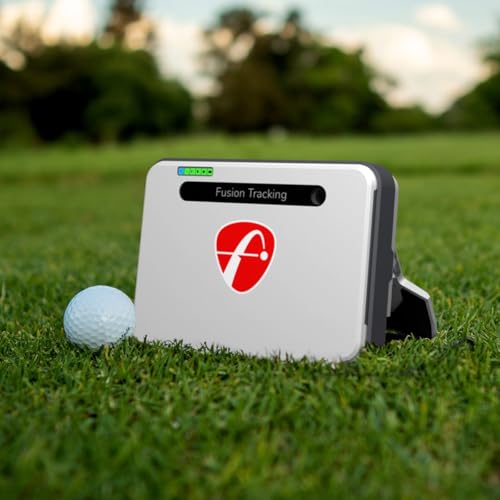
When you first unpack the FlightScope Mevo+, expect a professional and compact unit that feels solidly built, suitable for carrying to the range or setting up in your home. The packaging includes the launch monitor itself, a USB charging cable, a protective carrying case, and detailed instructions to get started smoothly. The design looks sleek and purposeful, blending modern tech with practical portability. It connects effortlessly to your iOS device via Bluetooth, allowing quick setup and access to powerful apps. You’ll also find integration with FlightScope’s MultiCam system, which supports syncing multiple videos for instant swing reviews. Overall, the unboxing experience sets the tone for a high-tech training tool ready to boost your game.
Specs at a Glance
| Feature | Details |
|---|---|
| Tracking Technology | FlightScope Fusion Tracking (3D Doppler + high-speed cameras) |
| Data Parameters | 22+ (full swing and short game metrics) |
| Golf Courses Included | 12 E6 Connect Courses (no subscription needed) |
| Practice Ranges | 17 individual practice range settings |
| Face Impact Software | Provides heat maps for sweet spot strikes |
| Video Integration | MultiCam syncing for up to 4 camera views (iOS only) |
| Range Ball Mode | Improved accuracy when using practice balls |
| Connectivity | Bluetooth to iOS devices |
| Power | Rechargeable internal battery |
| Dimensions | Compact, easy to transport |

Design & Build Quality
The FlightScope Mevo+ features a sleek, modern design with a matte black finish that feels durable and well-crafted. The compact size means it fits comfortably in your golf bag or can sit unobtrusively on any surface while you practice. One user commented, "The build quality is impressive — it feels solid and reliable, and it's easy to set up indoors or out." The unit’s thoughtful design balances portability and robustness, important when you need to take it between the course, home, or the driving range.
Materials cover a sturdy plastic exterior with a smooth finish that resists fingerprints and minor scratches. The device includes simple LED indicators to help you track power and Bluetooth connectivity without hassle. It doesn’t overwhelm with buttons or complicated controls, instead relying on app-based management through your smartphone or tablet. This makes it accessible whether you are tech-savvy or just starting with golf technology.
With the addition of the FlightScope MultiCam feature, the device supports connecting multiple iOS devices to capture swing video simultaneously, streamlining coaching and self-analysis. Setup for this multi-camera recording is intuitive, enhancing the learning experience by syncing high-quality visual feedback with precise radar data.
Real-World Performance
When you're ready to practice, the FlightScope Mevo+ truly shines. It captures over 22 parameters such as ball speed, launch angle, spin rate, carry distance, and even face impact location, giving you deep insights into each stroke’s nuances. Imagine stepping up to your tee shot or short game and instantly knowing exactly where you're striking the ball, how your clubface impacts, and how adjustments affect your trajectory.
For example, a golfer practicing indoors found that the face impact heat maps helped them identify a tendency to hit slightly toward the toe and adjust stance and grip accordingly. Not only did their shot accuracy improve, but the confidence gained from data-driven practice sessions transferred well to outdoor rounds.
The simulator function is equally compelling, offering you access to iconic courses like Pebble Beach and St Andrews without leaving home. You can test different swing adjustments and immediately see effects on ball flight and scoring. The FS Tracer feature visually follows the ball's 3D flight path, enhancing feedback beyond numbers alone.
Overall, this system transforms every practice session into a precise, measurable experience. You develop skills more efficiently by focusing on the exact data points that matter most, leading to better results on the course.

Check availability on Amazon →
What Makes It Stand Out?
Compared to other golf launch monitors like the SkyTrak and Garmin Approach G80, the FlightScope Mevo+ stands out with its proprietary Fusion Tracking, which combines 3D Doppler radar data with synchronized high-speed imagery. This blend offers more consistent and accurate data indoors and outdoors, especially when tracking short game shots where many devices struggle.
Another distinguishing feature is the comprehensive Face Impact Software. While many launch monitors report ball and swing data only, this extra layer shows you exact strike locations on the clubface, helping correct mishits faster. The MultiCam syncing capability also provides a unique teaching tool not often found in competitors, enabling multi-angle video reviews that sync perfectly with radar metrics.
The inclusion of 12 real golf courses via E6 Connect without additional subscriptions offers immediate simulator play, whereas other devices may charge ongoing fees. It’s a fully loaded package built for golfers who want both data precision and immersive simulation experiences.
Strengths vs. Trade-Offs
| Strengths ✅ | Trade-Offs ❌ |
|---|---|
| Fusion Tracking tech offers superior accuracy indoors/outdoors | Video features require multiple iOS devices for full use |
| 22+ parameters cover both full swing and short game data | Battery life demands regular recharging during long sessions |
| Includes 12 premium golf courses with no subscription | Some users find the app interface complex at first |
| MultiCam video syncing for enhanced swing analysis | Only compatible with iOS devices for video functions |
| Face Impact Location maps improve sweet spot hitting | Larger learning curve for new users unfamiliar with launch monitors |

Who Is It For?
This launch monitor suits golfers who are committed to refining their skills with data-depth rather than guesswork. First, avid amateurs and weekend warriors who want to practice indoors during off-seasons or bad weather will appreciate the simulator's lifelike course experiences and detailed feedback.
Teachers and club fitters will also benefit from the MultiCam and Face Impact tools, which provide visual and radar data to better analyze student swings or club performance. This device enhances coaching sessions by combining video review and exact strike location.
Finally, competitive players looking to dial in precise distances, spin rates, and impact consistency before tournaments will find the level of detail indispensable for making strategic adjustments. If you’re aiming for measurable improvement through technology, this is a go-to tool.
Expert Advice to Maximize Results
To get the best from your FlightScope Mevo+, start by familiarizing yourself with the 22+ data parameters to understand what each means and how it impacts your game. Use the Face Impact software to identify consistent strike patterns and work specifically on hitting the center of the clubface.
Set up your practice space with the recommended distance from the monitor to ensure accurate tracking, especially indoors. Experiment with the range ball mode if you practice with different balls to maintain data accuracy.
Use the MultiCam video syncing to capture your swing from multiple angles and match data with visuals. This helps in spotting subtle flaws or improvements in your posture and timing. Don’t hesitate to explore the simulator golf courses for meaningful practice rounds, as this builds experience beyond mere driving range hits.
Above all, review your data and videos regularly and adjust your practice focus based on measurable progress areas.

FAQ
1. How accurate is the FlightScope Mevo+ indoors versus outdoors?
The Mevo+ uses patented Fusion Tracking technology combining radar with high-speed cameras, resulting in highly accurate and consistent data both indoors and outdoors. While some launch monitors perform better outdoors, the Mevo+ maintains excellent performance inside, especially when you set it up at the recommended distances.
2. What devices does the FlightScope Mevo+ connect to?
The monitor connects primarily to iOS devices such as iPhones and iPads via Bluetooth. The MultiCam video recording and syncing features require iOS devices. Android users can access limited features via the FS Golf app but won’t utilize full video capabilities.
3. Can I use any golf balls with the Mevo+?
Yes, but to get the most accurate data, use the range ball setting if practicing with range balls. This adjusts the radar readings to accommodate differences in ball behavior compared to standard golf balls, improving measurement precision.
4. Is there a subscription fee for the included golf courses?
No, the 12 E6 Connect courses including Pebble Beach and St Andrews are included with the Mevo+ and do not require a subscription. This gives you access to realistic golf simulations right away.
5. How long does the battery last?
Battery life varies depending on usage but typically supports several hours of play before needing a recharge. It's rechargeable via USB cable included.
6. Does the monitor help with short game practice?
Absolutely. It tracks over 22 data parameters including short game metrics like club path and ball impact location, helping you fine-tune your chipping and pitching.
7. What makes Face Impact software unique?
This add-on maps the exact spot on the clubface where the ball strikes, providing a heat map that shows your consistency and helps you adjust your swing to hit the sweet spot more often, boosting ball control and distance.
Verdict
The FlightScope Mevo+ GPS Golf Launch Monitor combines cutting-edge tracking technology, detailed data, and immersive simulation to elevate your golf practice. Its multiple camera integration and impact analysis tools stand out for serious golfers seeking measurable improvement. Whether honing your swing indoors or enjoying virtual rounds on world-famous courses, this monitor equips you to track progress and play smarter.