


Garmin Approach R50 Golf Launch Monitor & Simulator Review






Product Overview
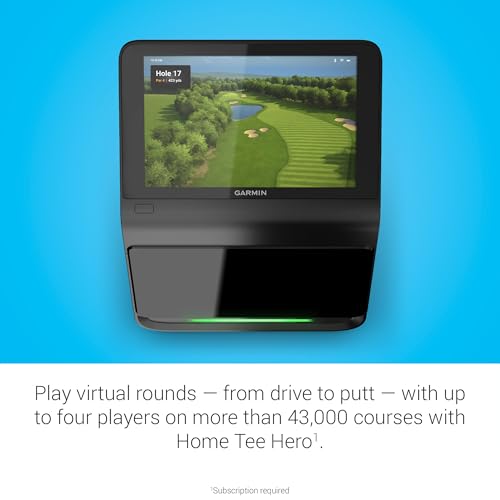
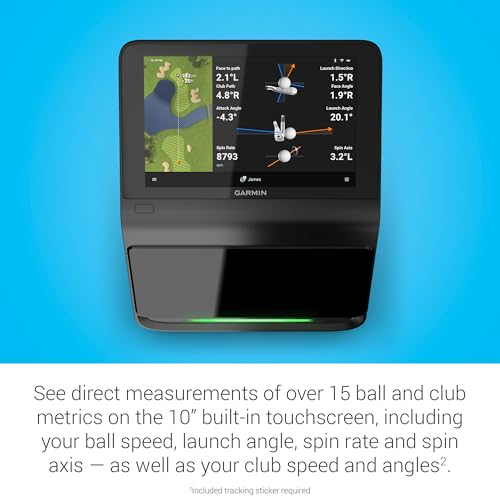
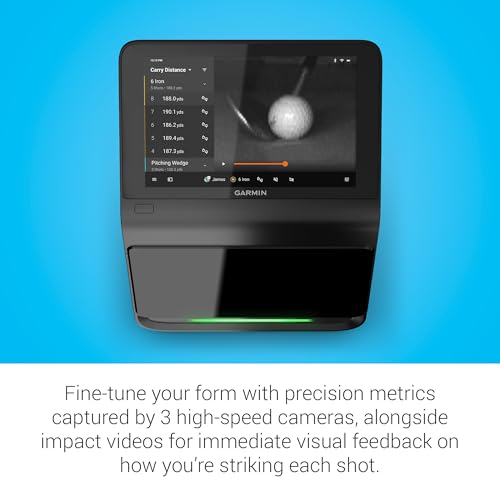
When you're aiming to refine your golf skills at home or on the range, the Garmin Approach R50 Golf Launch Monitor & Simulator offers a comprehensive solution. This device uses a sophisticated 3-camera system to capture swing metrics with precision, helping you better understand every facet of your game. With a 10-inch color touchscreen, you can easily navigate through detailed metrics like ball speed, launch angle, spin rate, and face-to-path measurements. The built-in GPS provides virtual course overviews from over 43,000 courses, making it possible to play full simulated rounds. Plus, it offers instant impact video feedback, so you see exactly how your swing shapes each shot. The included Signature Series 4K HDMI Cable lets you connect to larger displays to elevate your experience.
Disclosure: As an Amazon Associate I earn from qualifying purchases.
Key Takeaways
- Offers over 15 precise swing and ball metrics with 3-camera tracking system.
- Built-in simulator supports virtual rounds on 43,000+ courses with multiplayer mode and tournaments.
- Large 10” color touchscreen simplifies reviewing stats, videos, and course info easily on-device.
- Includes 4K HDMI cable and carrying case for ready-to-go setup and transport.
- Requires Garmin Golf membership subscription for advanced simulator features.
- May need minor setup time to get used to the tracking stickers and calibration.
Why You Might Want the Garmin Approach R50 Golf Launch Monitor & Simulator
If you’re serious about improving your golf game, having detailed data on your swing and shots is vital. This tool helps by delivering a wealth of measurable insights that go beyond simply measuring distance. Whether you struggle to understand how your clubface impacts ball spin or want a fun way to practice indoors, this monitor addresses those needs. It’s especially handy if you want to practice effectively despite weather or time constraints, bringing real course simulation right to your home or range. The monitor also supports social features like global leaderboards and tournaments, helping you stay motivated while challenging friends or other players worldwide.
First Impressions: What to Expect
Unboxing the Garmin Approach R50, you’ll find the monitor thoughtfully packaged with all essentials to get started quickly. The Signature Series 4K HDMI Cable stands out as a premium accessory, supporting high-quality video connections to external displays. The unit itself feels solid and well-built, featuring a sleek, compact frame with a bright 10-inch touchscreen that is responsive and clear in daylight. You’ll also notice the included carrying case, great for keeping everything protected when hitting the driving range or storing at home. Setup instructions are straightforward, though you will want to invest a bit of time calibrating the device and placing the included tracking stickers on your golf ball for optimal data accuracy.
Specs at a Glance
| Feature | Description |
|---|---|
| Display | 10" Color Touchscreen |
| Camera System | 3 built-in cameras |
| Metrics Tracked | Over 15 metrics including ball speed, launch angle, spin rate, face to path |
| Simulator Courses | 43,000+ courses via Garmin Home Tee Hero |
| Multiplayer | Supports up to 4 players |
| Barometer | Built-in for atmospheric pressure |
| Video Feedback | High-speed impact video playback |
| Included Accessories | Signature Series 4K HDMI Cable 50FT, carrying case |
Design & Build Quality
The Garmin Approach R50 sports a modern, streamlined look that fits perfectly in a tech-savvy golfer's setup. It’s lightweight yet durable, using quality materials that feel sturdy without being cumbersome. The 10-inch touchscreen is a standout feature—bright, highly responsive, and large enough to easily display complex data and course maps without crowding. The back features the built-in cameras neatly integrated for seamless tracking without obstructing your swing area. A user review highlights, “The device feels premium and well-put-together, like a gadget that’s made to last and perform consistently.” Its portability is enhanced by the included carrying case, which is padded and has dedicated compartments for the monitor and HDMI cable, making transport hassle-free.
The sleek design doesn't just serve aesthetics—it's functional for both indoor and outdoor use. The barometer sensor cleverly adjusts carry distances based on altitude and atmospheric pressure, a thoughtful touch that ensures accuracy regardless of location. Overall, the design balances performance and convenience expertly.
Real-World Performance
When you take the Garmin Approach R50 out to the range or set it up indoors, the differences it surfaces in your swing become clear quickly. For example, a typical session might begin with you selecting your club on the touchscreen, then taking a few practice swings. Each shot is tracked in high detail, providing data on ball speed, launch angles, and spin directly on-screen. The launch monitor will also show face-to-path angles, helping you diagnose slice or hook tendencies you might not feel in the moment.
One anecdote from users often mentioned: setting it up at home with the included HDMI cable connected to a large screen turns a dull practice session into a virtual golf experience. You can play a round on a well-known course, compete in weekly tournaments, and get instant video feedback of your swing at impact. This visual insight, combined with precise stats, makes it easier to adjust your stroke and understand your shot shape.
Its portability lets you bring it to outdoor ranges to compare conditions and performance indoors versus outside. The built-in barometer means your carry distances adapt to the environment, adding reliability to practice data you can trust. Whether you want to fine-tune each club or just enjoy simulated golf play with friends, its real-life versatility shines.
What Makes It Stand Out?
Compared to the SkyTrak Launch Monitor and the Voice Caddie SC200 Plus, the Garmin Approach R50 distinguishes itself primarily with its integrated 3-camera tracking system, which allows it to collect a broad range of swing metrics with remarkable precision. While SkyTrak is also strong in ball flight analytics, the Approach R50's impact video feedback combined with advanced spin rate and axis analysis offers an extra visual learning layer.
Additionally, the Garmin model comes with an extensive course library (over 43,000 courses), supporting multiplayer simulation play directly on the device. This wide selection and social tournament features are more expansive than many competitors, making it especially appealing for golfers who want immersive practice sessions with community aspects.
The inclusion of a premium 50ft 4K HDMI cable is a thoughtful advantage too, enabling seamless connection to large displays without needing additional purchases. Its portability with a dedicated carrying case also ensures you can take it to the range or on trips hassle-free.
While some other launch monitors might require extra accessories or apps to unlock similar features, the Garmin Approach R50 delivers an all-in-one bundled experience designed for convenience, detailed feedback, and engaging practice.
Strengths vs. Trade-Offs
| Strengths ✅ | Trade-Offs ❌ |
|---|---|
| 3-camera system tracks over 15 precise metrics | Requires tracking stickers on golf balls |
| Includes built-in simulator with 43,000+ courses | Subscription needed for full simulator access |
| 10” vivid color touchscreen with intuitive UI | Setup and calibration take some initial time |
| High-speed impact video playback for feedback | Some users need adjustment to data accuracy outdoors |
| Premium 4K HDMI Cable 50FT included | Multiplayer limited to 4 players |
| Portable with protective carrying case | Bulkier than some ultra-compact launch monitors |
Who Is It For?
This launch monitor and simulator bundle is ideal if you are a dedicated golf enthusiast who practices regularly and wants detailed feedback to improve every aspect of your game. Whether you're a mid-handicapper looking to reduce your slice or a low-handicap player aiming to gain precise data on spin and launch angles, the metrics here cover your needs thoroughly.
It's also an excellent fit for golfers with limited access to courses who want to maintain or improve skills year-round at home. The virtual simulation and multiplayer options make it an engaging way to practice alone or with friends. Coaches and trainers can benefit from the detailed swing video analysis combined with data to give tailored instruction.
If you value a premium, ready-to-use setup that includes everything—from a high-definition HDMI cable to a carrying case—this package gets you started without needing additional accessories. It's suitable for technical learners who like to dig deep into their stats, as well as casual players wanting a fun golf simulation experience.
Expert Advice to Maximize Results
To get the most out of your Garmin Approach R50, start by dedicating time to properly set up and calibrate the system according to the instructions. Ensure you apply the tracking stickers on your golf balls as recommended to improve metric accuracy. Spend practice sessions focusing on one metric at a time, such as launch angle or spin, so you understand how your swing affects these variables deeply.
Leverage the impact video feedback feature regularly to visualize what your swing looks like at the moment of contact. This can reveal hidden flaws that numbers alone might not show. Use the training mode to track stats club-by-club, which helps identify weaknesses across your bag.
When indoors, connect to a large screen with the included 4K HDMI cable—it makes reviewing shots and playing simulated rounds far more immersive and enjoyable. Regularly participate in the online leaderboards or tournaments to stay motivated and engage with a community of golfers.
Finally, sync your data with the Garmin Golf app to keep detailed records of your progress and fine-tune your practice plans based on evolving insights.
Check availability on Amazon →
FAQ
Q1: What does the Garmin Approach R50 measure exactly?
It measures metrics like ball speed, launch angle, spin rate and axis, face-to-path, carry distance (adjusted with atmospheric data), and shot dispersion. It uses a 3-camera system plus tracking stickers for detailed tracking and provides real-time feedback on a 10” color touchscreen.
Q2: Can I use this launch monitor outdoors?
Yes, it is designed for both indoor and outdoor use. The built-in barometer adjusts carry distance according to atmospheric pressure, so your data remains accurate regardless of location. Be mindful of lighting conditions and ensure proper sticker placement for best results.
Q3: Do I need a subscription to access all features?
To play full virtual rounds on the simulator and participate in multiplayer tournaments, an active Garmin Golf membership subscription is required. However, you can still access most swing metrics and impact video features without it.
Q4: How portable is the Garmin Approach R50?
The device is quite portable and comes with a padded carrying case and a 50-foot 4K HDMI cable for easy setup at home or the range. It’s lightweight enough to transport easily between locations.
Q5: Is the 10-inch touchscreen easy to use?
Users praise the large, bright touchscreen for its responsiveness and ease of navigating through stats, videos, and course maps. It simplifies access to your data without needing to rely on a phone or tablet.
Q6: Can I connect this monitor to a TV or projector?
Yes, the included Signature Series 4K HDMI Cable lets you connect the approach monitor to external displays for a more immersive viewing and gaming experience.
Q7: How accurate is the data?
The 3-camera system and tracking stickers provide high accuracy for key metrics, and environmental conditions including pressure changes are accounted for. Some users recommend calibrating carefully and reapplying stickers regularly to maintain precision.
Verdict
The Garmin Approach R50 Golf Launch Monitor & Simulator offers a well-rounded package to help serious golfers refine their game with detailed metrics, high-speed video feedback, and comprehensive on-device simulation. Its blend of advanced technology and user-friendly design ensures you can quickly dive into meaningful practice sessions indoors or on the range. Whether you want better data to improve your swing or a fun way to play simulated rounds with friends, this device delivers compelling features and versatility in one complete bundle.